Changelog Jul 04, 2025 - Neon
Name your computes, TanStack integration, Neon Auth enhancements, and more
Give your computes a custom name
Section titled “Give your computes a custom name”You can now assign custom names to your branch’s computes. In the Neon Console, go to the Branches page, select a branch, and open the Compute tab. Click the edit icon next to a compute to rename it.
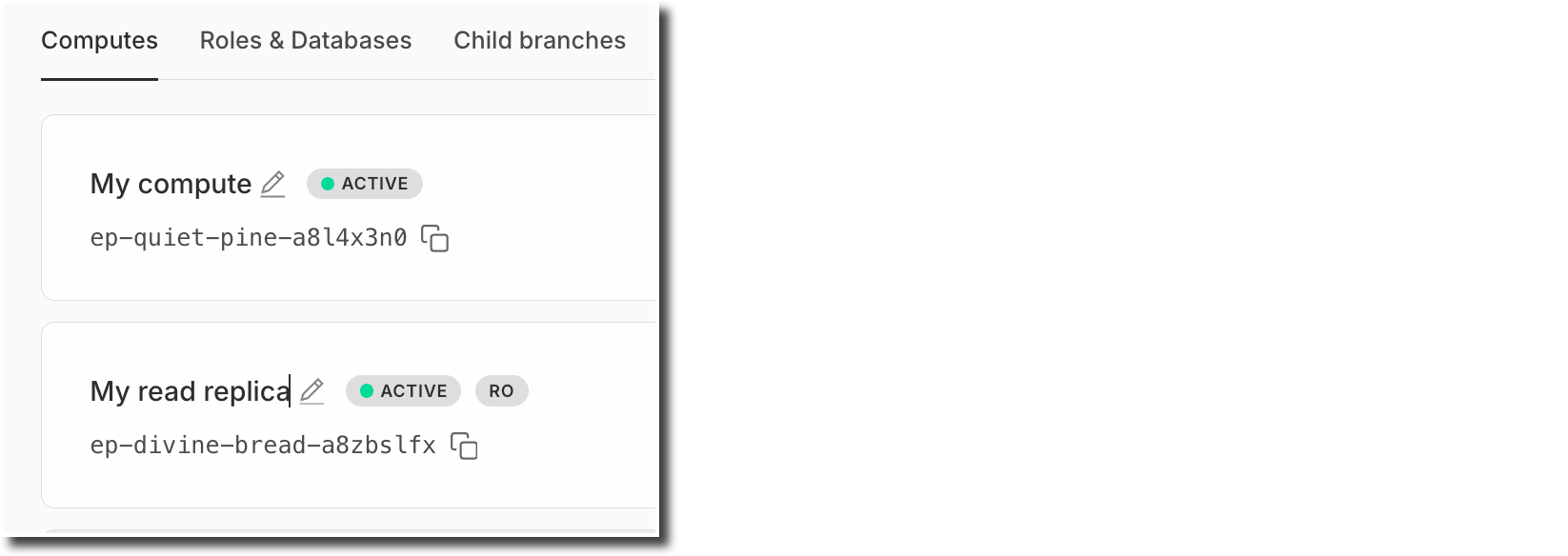
You can also set a name when adding a new compute.
This enhancement is supported for both primary (read-write) and read replica computes.
TanStack integration & new open-source tools for JavaScript developers
Section titled “TanStack integration & new open-source tools for JavaScript developers”We're excited to announce that Neon is now the official database partner of TanStack, and that we’ve released new open-source tools to simplify Postgres integration across the TanStack and Vite ecosystems:
- Create TanStack Add-on
Instantly set up a fullstack application with a Neon Postgres database with one simple command:pnpm create tanstack --add-on neon - Instagres (formerly Neon Launchpad)
Instantly spin up a Postgres database with Instagres; no signup required. Perfect for workshops and rapid prototyping. Try it at neon.new. Update: The URL has returned to neon.new after a period at pg.new. To learn more, see our Claimable Postgres docs. - neon-new (CLI)
Bootstrap Neon Postgres database with theneon-newCLI:
npx neon-new --yes
Or integrate programmatically viainstantNeon(). - Vite Plugin for Neon
Use Claimable Postgres to spin up a Postgres database with any Vite app:
npm add -D vite-plugin-neon-new
Update: The CLI was npx neondb and the Vite plugin was @neondatabase/vite-plugin-postgres at the time of this release; they are now npx neon-new and vite-plugin-neon-new.
These open-source tools are designed to streamline fullstack development with TanStack, Vite, and Postgres. Learn more:
OAuth provider management for Neon Auth
Section titled “OAuth provider management for Neon Auth”You can now manage your project's OAuth providers (Google, GitHub, Microsoft) directly in the Neon Auth config tab: enable or disable providers, and choose between using shared Neon Auth credentials or setting up your own custom client credentials.
New API endpoints also let you manage providers programmatically:
To learn more, see the Neon Auth documentation.
Fixes
- Addressed an issue where projects created via Netlify DB and claimed into Vercel-managed org accounts could lose certain project configuration settings. To avoid this issue, transfers of projects created via Netlify DB to Vercel-managed org accounts are currently not supported.
Neon CLI
- The Neon CLI now supports a
--nameoption that you can use when adding a compute or a read replica to a Neon branch.Bash neon branches add-compute mybranch --name myreplica --type read_only - The CLI now automatically detects invalid credentials (401 responses), deletes them, and prompts for re-authentication instead of failing immediately
- 🚀 If you're not using the Neon CLI yet, get set up in just a few steps with the Neon CLI Quickstart.