Trigger on an object upload
A storage_object_created trigger tells Neon to invoke a deployed Neon Function when an object is created in an Object Storage bucket. Optionally scope it to a key prefix, so only uploads under that pa...
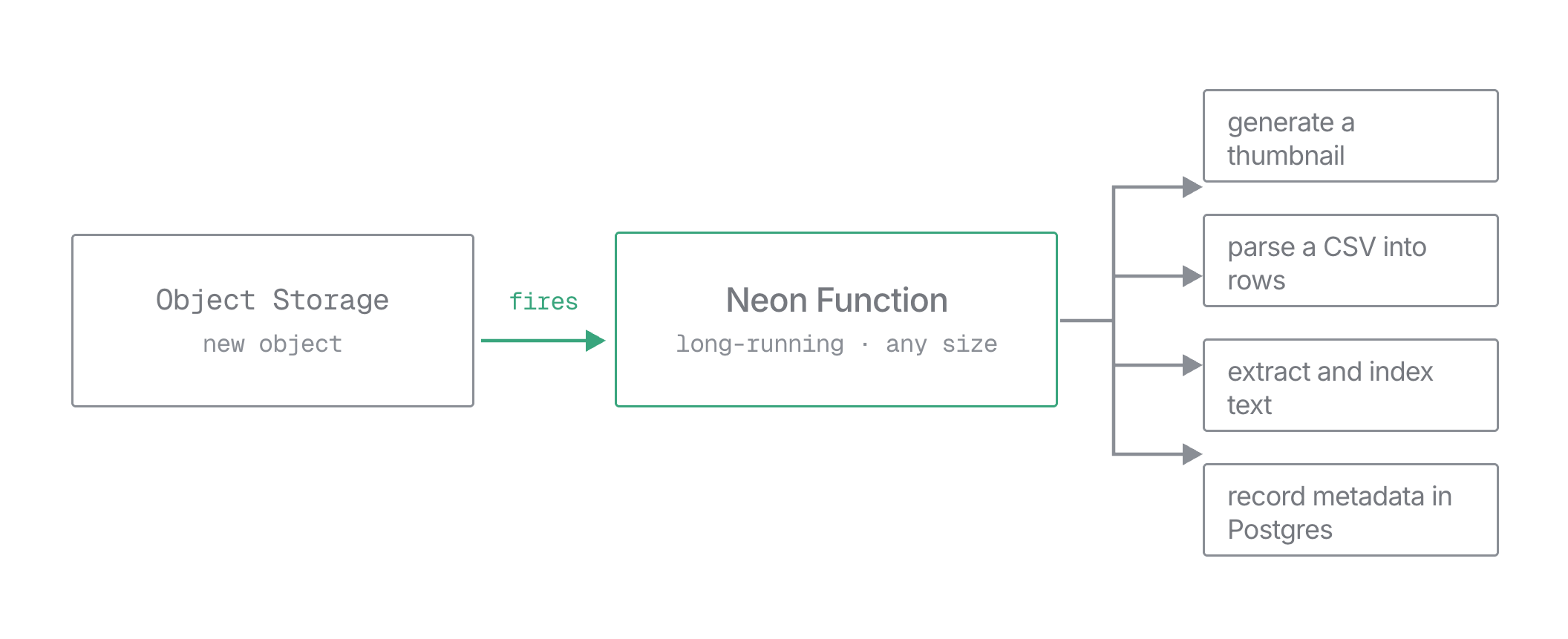
A storage_object_created trigger tells Neon to invoke a deployed Neon Function when an object is created in an Object Storage bucket. Optionally scope it to a key prefix, so only uploads under that path fire the function. There's no external event wiring and no compute kept running to watch the bucket.
For what a trigger is and how it behaves across branches, see the overview. The scheduled trigger type is covered in Schedule a function; this page covers the object-created type. You can manage object-created triggers from the Neon Console, the neon triggers CLI, the Neon API, or declaratively in neon.ts; the steps below show each.
Because the function is long-running, it can do real work on each upload, whatever the file size.
Before you begin
Section titled “Before you begin”You need a deployed function and its slug, and a bucket on the branch. The API also needs a Neon API key; the Console doesn't. If you deployed with the CLI, neon link already wrote your project and branch to a .neon file; you can also find the IDs in the Neon Console.
The API examples use these variables:
export API="https://console.neon.tech/api/v2"
export NEON_API_KEY="<your-api-key>"
export PROJECT_ID="<your-project-id>"
export BRANCH_ID="<your-branch-id>"
To build this with an AI agent, start from this prompt and fill in the task:
Create a Neon Function that <task>, then trigger it on new uploads with a Function Trigger.
Docs: https://neon.com/docs/compute/functions/triggers/object-storage.md

- Add one unauthenticated POST route (trigger invocations arrive without credentials). Read `data.bucket_name` and `data.object_key` from the JSON body; keep the handler idempotent.
- If the task uses Postgres, connect with the injected DATABASE_URL.
- Deploy it, then create a `storage_object_created` trigger via the Console, CLI, API, or `neon.ts` with the bucket name, optionally scoped to a key prefix. Upload an object to confirm a run in the logs.
- The route and trigger both default to `/`; set `function_path` on both if you want a different path.
Write a handler for the upload event
An object-created invocation is a
POSTwhose JSON body carries the occurrence:data.bucket_name,data.object_key, thetriggerthat fired, and aninvocation_id. Neon delivers it to the function's public URL, so the route sits outside your auth middleware. You can confirm the call came from Neon with theX-Neon-Trigger-Invocation-Idheader (see Confirming a request came from Neon); keep the handler idempotent and guard destructive actions regardless.This Hono function records each uploaded object. From here you'd typically fetch and process the object, enqueue a job, or notify another service:
TypeScript import { Hono } from 'hono'; import { neon } from '@neondatabase/serverless'; const app = new Hono(); const sql = neon(process.env.DATABASE_URL!); // This route is public. Neon strips client-set X-Neon-* headers, so the presence of // X-Neon-Trigger-Invocation-Id attests the call came from Neon's trigger system. app.post('/', async (c) => { if (!c.req.header('x-neon-trigger-invocation-id')) { return c.json({ error: 'not a trigger call' }, 403); } const { data } = await c.req.json<{ data: { bucket_name: string; object_key: string } }>(); const { bucket_name: bucket, object_key: key } = data; await sql` INSERT INTO uploads (bucket, object_key) VALUES (${bucket}, ${key}) ON CONFLICT (bucket, object_key) DO NOTHING `; console.log(`object created: ${bucket}/${key}`); return c.json({ ok: true, bucket, object_key: key }); }); export default app;DATABASE_URLis injected for you. See Environment variables. TheON CONFLICT (bucket, object_key) DO NOTHINGclause makes a redelivered occurrence a no-op.Create the table it writes to, in the Neon SQL Editor or with
neon psql:SQL CREATE TABLE IF NOT EXISTS uploads ( bucket text, object_key text, seen_at timestamptz NOT NULL DEFAULT now(), PRIMARY KEY (bucket, object_key) );Then deploy the function:
Bash neon functions deploy onupload --src functions/onupload.tsCreate the trigger
With the function deployed, create the trigger. It fires when an object is created in the bucket, optionally scoped to a key prefix.
In the Neon Console, open Functions, click the ⋮ menu next to your function, and select Manage Triggers. Click Create trigger (the Function is already set to the one you opened) and choose Object upload under Trigger type, then fill in:
- Trigger name: a label, unique across the branch, including inherited triggers.
- Function path: the request path sent to the function. Defaults to
/. - Bucket name: matches this bucket name exactly.
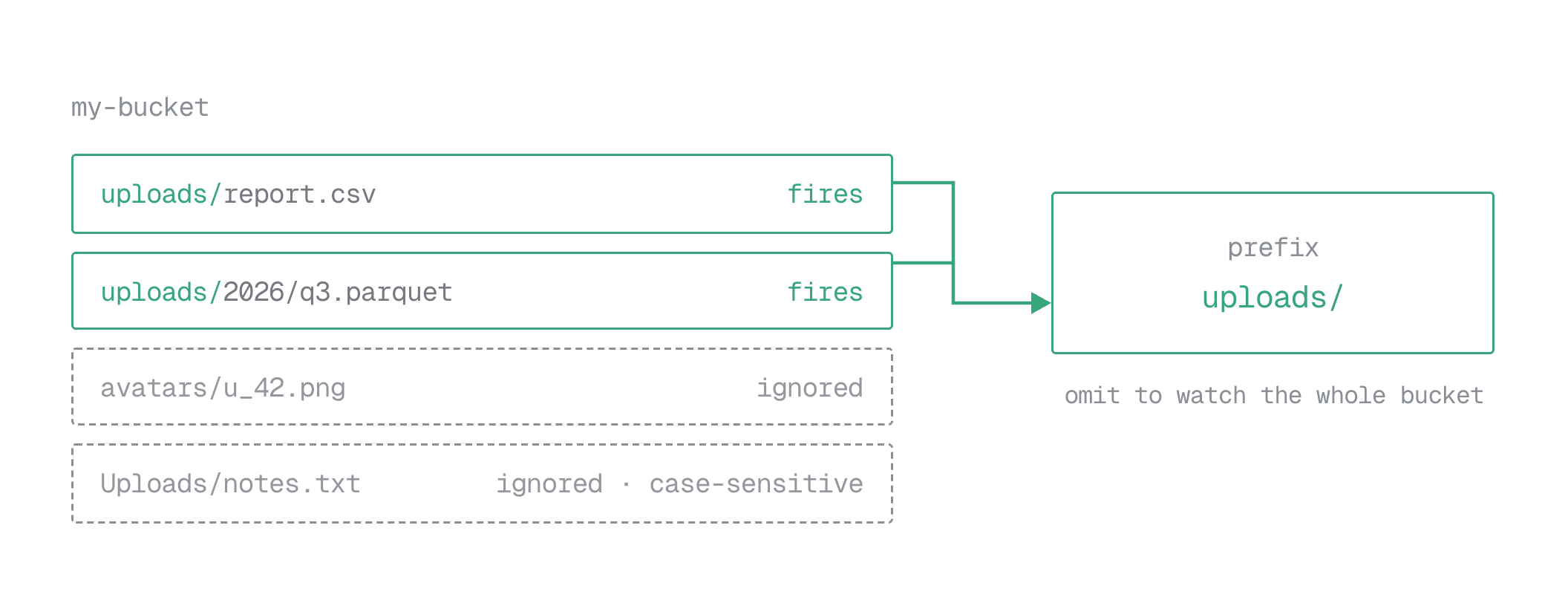
- Path prefix (optional): matches object keys that start with this exact, case-sensitive prefix. Leave blank to match every object in the bucket.
- Enable trigger: on by default.
Click Create trigger to save.
neon triggers createneeds--function-slug,--name, and--bucket;--prefix,--function-path, and--enabledare optional. Object-created triggers require Neon CLI 4.21.0 or later.Bash neon triggers create --function-slug onupload --name record-uploads --bucket my-bucket --prefix 'uploads/'The CLI resolves the project and branch from your context file, or pass
--project-idand--branch. Seeneon triggersfor the full command reference.POSTto the branch's triggers collection.type,function_slug,name, andstorage_object_created(withbucket_name) are required;prefix,function_path, andenabledare optional.Bash curl -X POST "$API/projects/$PROJECT_ID/branches/$BRANCH_ID/triggers" \ -H "Authorization: Bearer $NEON_API_KEY" \ -H "Content-Type: application/json" \ -d '{ "type": "storage_object_created", "function_slug": "onupload", "name": "record-uploads", "storage_object_created": { "bucket_name": "my-bucket", "prefix": "uploads/" }, "function_path": "/", "enabled": true }'Neon responds
201with the trigger wrapped in atriggerobject:JSON { "trigger": { "type": "storage_object_created", "trigger_id": "trigger-1a2b3c4d-5e6f-7890-abcd-ef1234567890", "function_slug": "onupload", "name": "record-uploads", "function_path": "/", "storage_object_created": { "bucket_name": "my-bucket", "prefix": "uploads/" }, "enabled": true, "version": 1347042, "inherited": false } }Unlike a scheduled trigger, an object-created trigger has no
scheduleornext_run_at: it fires on the event, not the clock.Declare the trigger in the top-level
triggersrecord inneon.ts, withfunctionpointing at your function's slug, then apply it withneon deploy.bucketselects the bucket andprefixoptionally scopes it to keys under that path.TypeScript functions: { onupload: { name: "On upload", source: "./functions/onupload.ts", }, }, triggers: { "record-uploads": { type: "storage_object_created", function: "onupload", bucket: "my-bucket", prefix: "uploads/", }, },Confirm it ran
Upload an object under the bucket and prefix you configured (see Upload and manage objects), then read the function's logs:
Bash neon logs query --source functionYour
object created: ...line appears with thebucket_nameandobject_keyfrom the request body. See Observability for why that line matters.To iterate on the handler without uploading objects, replay the payload against
neon devlocally. See Test triggers locally.
What your function receives
Section titled “What your function receives”An object-created invocation delivers the same envelope shape as every trigger type, with trigger.type set to storage_object_created and the event details under data:
{
  "version": 1,
  "invocation_id": "abc123FUPHOw0Pl1ZooidgpJhvHaShi1aX40cQ0b321",
  "trigger": { "type": "storage_object_created", "id": "trigger-1a2b3c4d-5e6f-7890-abcd-ef1234567890", "name": "record-uploads" },
  "data": {
    "bucket_name": "my-bucket",
    "object_key": "uploads/report.csv"
  }
}data.bucket_name: the bucket the object was created in.data.object_key: the full key of the created object, including any prefix.
The request carries the same headers as any trigger invocation. For the full envelope, headers, and how to confirm a request came from Neon, see What your function receives in the overview.
Trigger config
Section titled “Trigger config”The object-created settings live under storage_object_created:
| Field | Required | Description |
|---|---|---|
bucket_name |
Yes | The bucket to watch, on the trigger's branch. |
prefix |
No | Only objects whose key starts with this prefix fire the trigger. Omit to watch the whole bucket. |
The top-level type, function_slug, name, function_path, and enabled fields, and the read-only trigger_id / version / inherited, work exactly as in Trigger fields.
Manage triggers
Section titled “Manage triggers”List, update, disable, and delete triggers from the Console, CLI, or API. Triggers declared in neon.ts are managed by editing the declaration and re-running neon deploy.
Manage object-created triggers from the same Functions → ⋮ → Manage Triggers panel: edit a trigger's fields, toggle Enable trigger on or off, or delete it.
The neon triggers command group manages triggers by ID:
neon triggers list
neon triggers get <trigger-id>
neon triggers update <trigger-id> --bucket my-bucket --prefix 'incoming/'
neon triggers disable <trigger-id>
neon triggers enable <trigger-id>
neon triggers delete <trigger-id>
See neon triggers for every subcommand and flag.
Listing, getting, updating, disabling, and deleting use the same endpoints as scheduled triggers, described in Manage triggers. A PATCH must include the type discriminator; for this type you can change function_slug, name, function_path, enabled, and the storage_object_created config (for example, to move the watched prefix):
curl -X PATCH "$API/projects/$PROJECT_ID/branches/$BRANCH_ID/triggers/$TRIGGER_ID" \
  -H "Authorization: Bearer $NEON_API_KEY" \
  -H "Content-Type: application/json" \
  -d '{
    "type": "storage_object_created",
    "storage_object_created": { "bucket_name": "my-bucket", "prefix": "incoming/" }
  }'
Observability
Section titled “Observability”In the platform logs, an object-created invocation looks like any other HTTP call: the invoke begin and invoke end lines under the neon.function.request scope are the same either way. Trace a run from your own handler output instead. A console.log that includes the object key gives you a searchable line tied to the run that produced it:
console.log(`object created: ${bucket}/${key}`);Your output appears under the neon.function.app scope, in the Console's Functions tab and in neon logs query --source function (not the functions command group). Standard Node instrumentation such as Sentry or OpenTelemetry also works, and the incoming traceparent header ties a run into an existing trace.
Common errors
Section titled “Common errors”The API rejects a bad request with an HTTP status and message:
| Situation | Status | Message |
|---|---|---|
A trigger with that name already exists on the branch |
409 |
function trigger name already exists on branch |
No storage_object_created object |
400 |
storage_object_created (field required) |
storage_object_created without bucket_name |
400 |
bucket_name (field required) |
A query string in function_path |
400 |
invalid function trigger path |
| No function with that slug on the branch | 404 |
target function not visible on branch |
The request body is strict: any field not in the schema is rejected rather than ignored, so a typo fails loudly. The function is identified by function_slug; there's no function_id field.
Related
Section titled “Related”- Function Triggers overview
- Schedule a function: the time-based trigger type
- Triggers in
neon.ts: declare triggers as code - Object Storage and Upload and manage objects
- Deploy and manage
- Logs