Connect with psql
The following instructions require a working installation of psql. The psql client is the native command line client for Postgres. It provides an interactive session for sending commands to Postgres a...
The following instructions require a working installation of psql. The psql client is the native command-line client for Postgres. It provides an interactive session for sending commands to Postgres and running ad-hoc queries. For more information about psql, refer to the psql reference, in the PostgreSQL Documentation.
How to install psql
Section titled “How to install psql”If you don't have psql installed already, follow these steps to get set up:
brew install libpq
echo 'export PATH="/usr/local/opt/libpq/bin:$PATH"' >> ~/.zshrc
source ~/.zshrcbrew install libpq
echo 'export PATH="/opt/homebrew/opt/libpq/bin:$PATH"' >> ~/.zshrc
source ~/.zshrcsudo apt update
sudo apt install postgresql-clientDownload and install PostgreSQL from:
https://www.postgresql.org/download/windows/
Ensure psql is included in the installation.
Connect to Neon with psql
Section titled “Connect to Neon with psql”The easiest way to connect to Neon using psql is with a connection string.
You can obtain a connection string by clicking the Connect button in the Console nav to open the Connect to your branch modal. Select a branch, a role, and the database you want to connect to. A connection string is constructed for you.
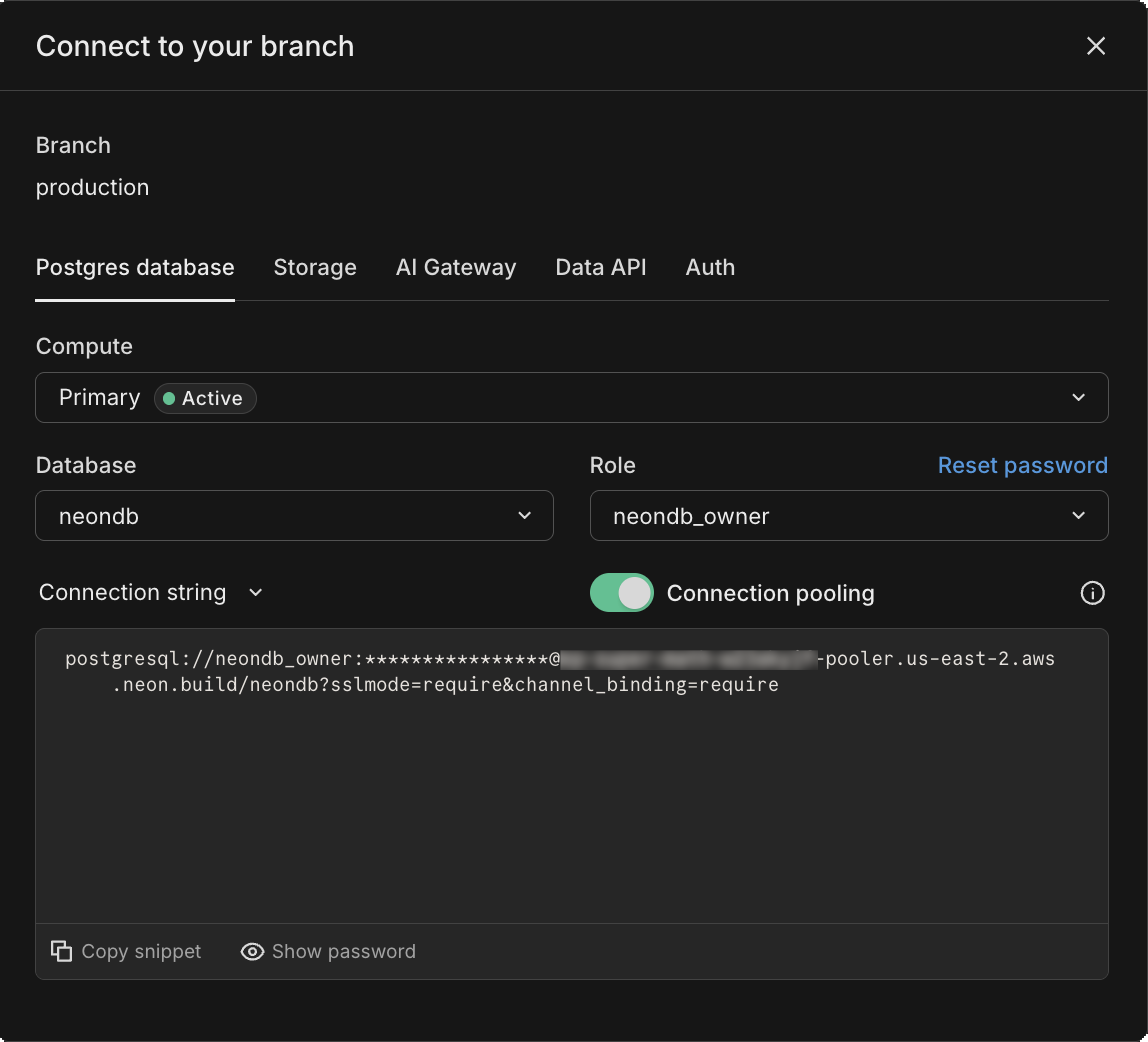
From your terminal or command prompt, run the psql client with the connection string copied from the Neon Dashboard.
psql postgresql://[user]:[password]@[neon_hostname]/[dbname]Where do I obtain a password?
Section titled “Where do I obtain a password?”You can obtain a Neon connection string by clicking the Connect button in the Console nav to open the Connect to your branch modal.
What port does Neon use?
Section titled “What port does Neon use?”Neon uses the default Postgres port, 5432. If you need to specify the port in your connection string, you can do so as follows:
psql postgresql://[user]:[password]@[neon_hostname][:port]/[dbname]Running queries
Section titled “Running queries”After establishing a connection, try running the following queries:
CREATE TABLE my_table AS SELECT now();
SELECT * FROM my_table;
The following result set is returned:
SELECT 1
              now
-------------------------------
 2022-09-11 23:12:15.083565+00
(1 row)
Meta-commands
Section titled “Meta-commands”The psql client supports a variety of meta-commands, which act like shortcuts for interacting with your database.
Benefits of Meta-Commands
Section titled “Benefits of Meta-Commands”Meta-commands can significantly speed up your workflow by providing quick access to database schemas and other critical information without needing to write full SQL queries. They are especially useful for database management tasks, making it easier to handle administrative duties directly from the Neon Console.
Available meta-commands
Section titled “Available meta-commands”Here are some of the meta-commands that you can use with psql.
Informational
  (options: S = show system objects, + = additional detail)
  \d[S+]                 list tables, views, and sequences
  \d[S+]  NAME           describe table, view, sequence, or index
  \da[S]  [PATTERN]      list aggregates
  \dA[+]  [PATTERN]      list access methods
  \dAc[+] [AMPTRN [TYPEPTRN]]  list operator classes
  \dAf[+] [AMPTRN [TYPEPTRN]]  list operator families
  \dAo[+] [AMPTRN [OPFPTRN]]   list operators of operator families
  \dAp[+] [AMPTRN [OPFPTRN]]   list support functions of operator families
  \db[+]  [PATTERN]      list tablespaces
  \dc[S+] [PATTERN]      list conversions
  \dconfig[+] [PATTERN]  list configuration parameters
  \dC[+]  [PATTERN]      list casts
  \dd[S]  [PATTERN]      show object descriptions not displayed elsewhere
  \dD[S+] [PATTERN]      list domains
  \ddp    [PATTERN]      list default privileges
  \dE[S+] [PATTERN]      list foreign tables
  \des[+] [PATTERN]      list foreign servers
  \det[+] [PATTERN]      list foreign tables
  \deu[+] [PATTERN]      list user mappings
  \dew[+] [PATTERN]      list foreign-data wrappers
  \df[anptw][S+] [FUNCPTRN [TYPEPTRN ...]]
                         list [only agg/normal/procedure/trigger/window] functions
  \dF[+]  [PATTERN]      list text search configurations
  \dFd[+] [PATTERN]      list text search dictionaries
  \dFp[+] [PATTERN]      list text search parsers
  \dFt[+] [PATTERN]      list text search templates
  \dg[S+] [PATTERN]      list roles
  \di[S+] [PATTERN]      list indexes
  \dl[+]                 list large objects, same as \lo_list
  \dL[S+] [PATTERN]      list procedural languages
  \dm[S+] [PATTERN]      list materialized views
  \dn[S+] [PATTERN]      list schemas
  \do[S+] [OPPTRN [TYPEPTRN [TYPEPTRN]]]
                         list operators
  \dO[S+] [PATTERN]      list collations
  \dp[S]  [PATTERN]      list table, view, and sequence access privileges
  \dP[itn+] [PATTERN]    list [only index/table] partitioned relations [n=nested]
  \drds [ROLEPTRN [DBPTRN]] list per-database role settings
  \drg[S] [PATTERN]      list role grants
  \dRp[+] [PATTERN]      list replication publications
  \dRs[+] [PATTERN]      list replication subscriptions
  \ds[S+] [PATTERN]      list sequences
  \dt[S+] [PATTERN]      list tables
  \dT[S+] [PATTERN]      list data types
  \du[S+] [PATTERN]      list roles
  \dv[S+] [PATTERN]      list views
  \dx[+]  [PATTERN]      list extensions
  \dX     [PATTERN]      list extended statistics
  \dy[+]  [PATTERN]      list event triggers
  \l[+]   [PATTERN]      list databases
  \lo_list[+]            list large objects
  \sf[+]  FUNCNAME       show a function's definition
  \sv[+]  VIEWNAME       show a view's definition
  \z[S]   [PATTERN]      same as \dp
For more information about meta-commands, see psql Meta-Commands.
Running psql from the Neon CLI
Section titled “Running psql from the Neon CLI”If you have psql and the Neon CLI installed, you can run psql commands directly from the Neon CLI using the connection-string command with the --psql option.
neon connection-string --psql -- -c "SELECT version()"For more examples, see Neon CLI commands — connection-string.
Need help?
Section titled “Need help?”Join our Discord Server to ask questions or see what others are doing with Neon. For paid plan support options, see Support.