Data anonymization
Need to test against production data without exposing sensitive information? Anonymized branches let you create development copies with masked personally identifiable information (PII) such as emails,...
Need to test against production data without exposing sensitive information? Anonymized branches let you create development copies with masked personally identifiable information (PII) - such as emails, phone numbers, and other sensitive data.
Neon uses PostgreSQL Anonymizer for static data masking, and applies masking rules when you create or update the branch. This approach gives you realistic test data while protecting user privacy and supporting compliance requirements like GDPR.
Key characteristics:
- Static masking: Data is masked once during branch creation or when you rerun anonymization
- PostgreSQL Anonymizer integration: Uses the PostgreSQL Anonymizer extension's masking functions
- Branch-specific rules: You can define different masking rules for each anonymized Neon branch
Create a branch with anonymized data
Section titled “Create a branch with anonymized data”To create a branch with anonymized data from the Neon Console:
- Select your project.
- Select Branches in the sidebar.
- Click New branch to open the branch creation dialog.
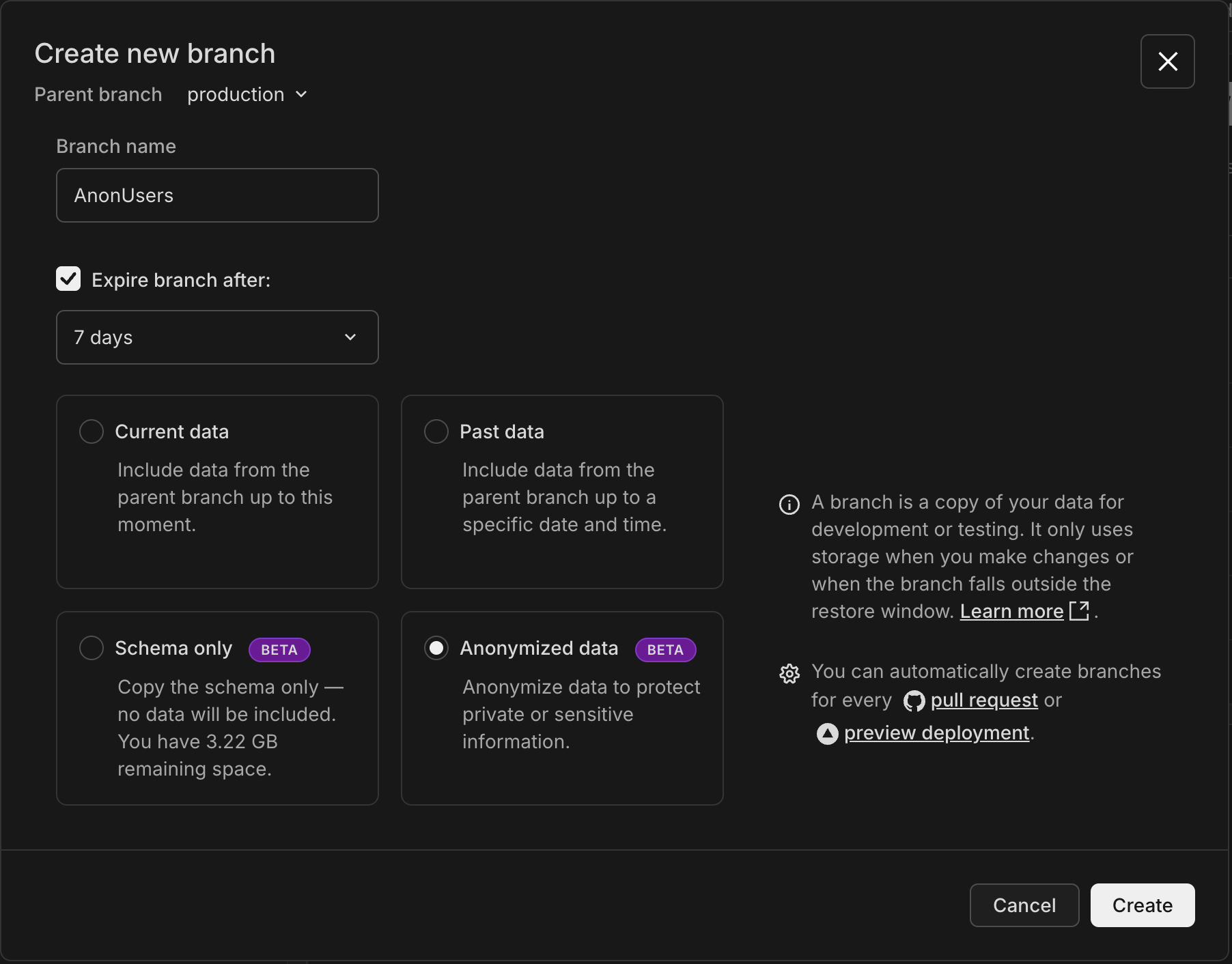
- Select a Parent branch. This determines the origin of the schema and data for your new branch. By default, your project's default branch (named
mainif the project was created with the CLI or API, orproductionif created in the Console) is selected, but you can choose any existing branch in your project. - Specify a branch name, or leave it blank to use the default generated name.
- Select the Anonymized data option.
- Configure auto-deletion: By default, Automatically delete branch after is checked with 1 day selected to help prevent unused branches from accumulating. You can choose 1 hour, 1 day, or 7 days, or uncheck to disable expiration entirely. This is useful for CI/CD pipelines and short-lived development environments. Note: This default only applies when creating branches through the Console; API branches have no expiration by default. Refer to our Branch expiration guide for details.
- Click Create to create your anonymized branch.
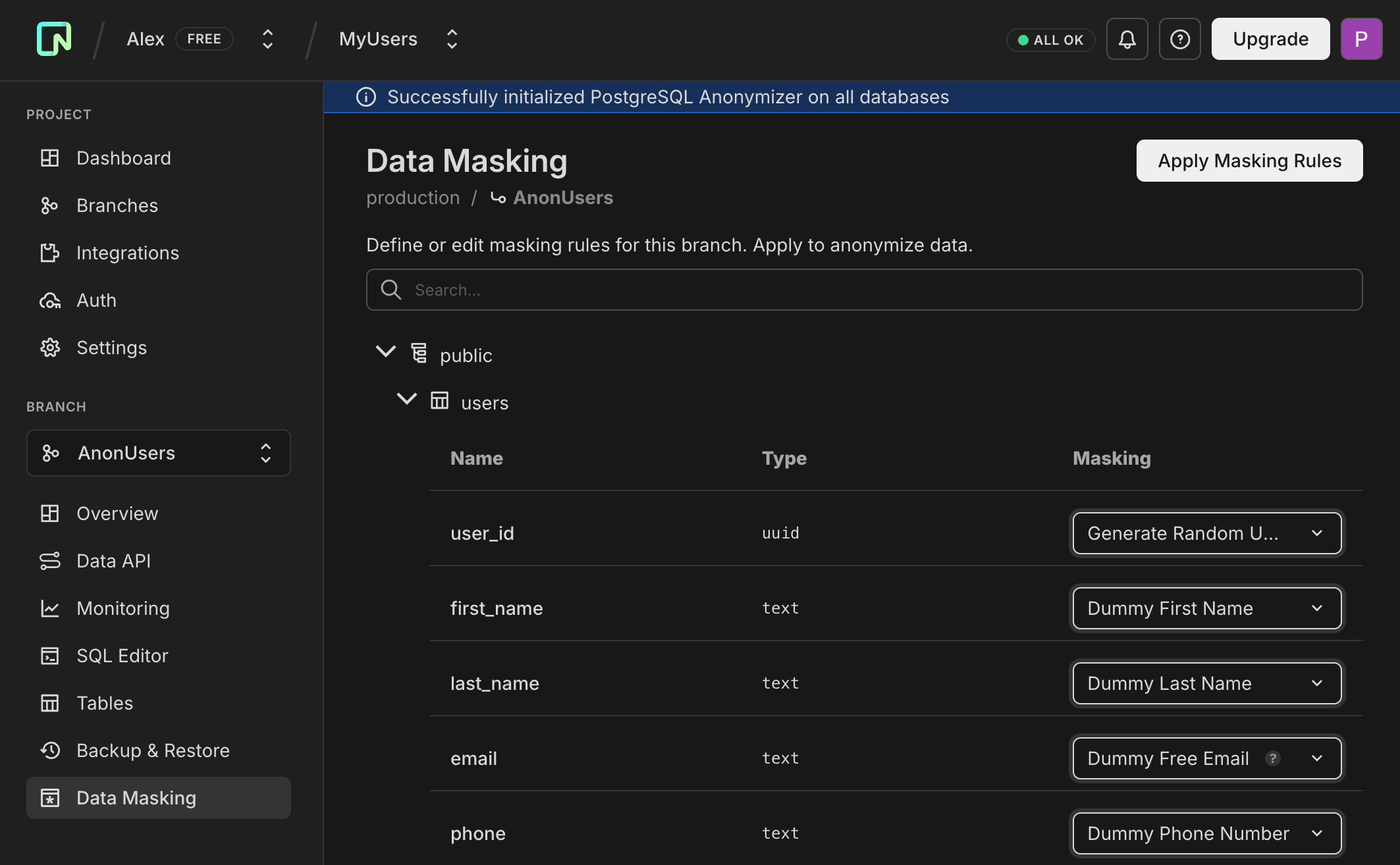
After creation, the Console loads the Data Masking page where you define and execute anonymization rules for your branch.
Use the Create anonymized branch endpoint, for example:
curl -X POST \
  'https://console.neon.tech/api/v2/projects/{project_id}/branch_anonymized' \
  -H 'Authorization: Bearer $NEON_API_KEY' \
  -H 'Accept: application/json' \
  -H 'Content-Type: application/json' \
  -d '{
    "masking_rules": [
      {
        "database_name": "neondb",
        "schema_name": "public",
        "table_name": "users",
        "column_name": "email",
        "masking_function": "anon.dummy_free_email()"
      }
    ],
    "start_anonymization": true
  }'
For complete parameter documentation and additional examples, see Create anonymized branch in the API reference. The API supports all PostgreSQL Anonymizer masking functions, providing more options than the Console UI. You can also export and import masking rules to manage them outside of Neon.
How anonymization works
Section titled “How anonymization works”When you create a branch with anonymized data:
-
Neon creates a new branch with the schema and data from the parent branch.
-
You define masking rules for tables and columns containing sensitive data. You can use any combination of these methods:
- Console: The Data Masking page opens automatically after branch creation.
- API: Include masking rules in the creation request or add them later via the masking rules endpoint.
- SQL: Connect to the branch (after initial anonymization) and use
SECURITY LABELcommands.
-
You apply the masking rules (in Console, click Apply masking rules; via API, call the start anonymization endpoint), and the PostgreSQL Anonymizer extension masks the branch data.
-
You can update rules and rerun anonymization on the branch as needed.
The parent branch data remains unchanged. Rerunning anonymization applies rules to the branch's current (already masked) data, not fresh data from the parent.
Manage masking rules
Section titled “Manage masking rules”You can create and manage masking rules via the Console, API, or SQL. All three methods are interchangeable and produce equivalent results.
From the Data Masking page:
- Select the schema, table, and column you want to mask.
- Choose a masking function from the dropdown list (for example, Dummy Free Email to execute
anon.dummy_free_email()). The Console provides a curated list of common functions. For the full set of PostgreSQL Anonymizer functions, you must use the API or SQL.
- Repeat for all sensitive columns.
- When you are ready, click Apply masking rules to start the anonymization job. You can monitor its progress on this page or via the API.
For complete API documentation with request/response examples, see the Data anonymization API reference. Note that the Console uses friendly labels for masking functions (for example, Random Unique Email), but the API returns and accepts the underlying PostgreSQL expressions (for example, pg_catalog.concat(anon.dummy_uuidv4(), '@example.com')).
Update masking rules
PATCH /projects/{project_id}/branches/{branch_id}/masking_rulesExample request to mask an email column:
curl -X PATCH \
  'https://console.neon.tech/api/v2/projects/{project_id}/branches/{branch_id}/masking_rules' \
  -H 'Authorization: Bearer $NEON_API_KEY' \
  -H 'Content-Type: application/json' \
  -d '{
    "masking_rules": [{
      "database_name": "neondb",
      "schema_name": "public",
      "table_name": "users",
      "column_name": "email",
      "masking_function": "anon.dummy_free_email()"
    }]
  }'
Important: The API replaces all masking rules with the provided array. To add a new rule, include all existing rules in your request.
Start anonymization
POST /projects/{project_id}/branches/{branch_id}/anonymizeGet anonymization status
GET /projects/{project_id}/branches/{branch_id}/anonymized_statusYou can create masking rules directly using PostgreSQL Anonymizer's SECURITY LABEL syntax. This requires connecting to your anonymized branch after it has reached the anonymized state (create and run initial rules via Console or API first).
Example creating a masking rule for an email column:
SECURITY LABEL FOR anon ON COLUMN users.email
IS 'MASKED WITH FUNCTION anon.dummy_free_email()';
Remove a masking rule:
SECURITY LABEL FOR anon ON COLUMN users.email IS NULL;Note: After creating or modifying rules via SQL, use the Console or API to run anonymization. Rules using standard functions appear normally in the Console; custom functions appear as text.
Retrieve masking rules
Section titled “Retrieve masking rules”You can view existing masking rules via the Console, API, or SQL.
From the Data Masking page, all defined masking rules are displayed for each table and column. Rules using standard functions appear as dropdown selections, while custom rules (functions not available in the Console dropdown) appear as text showing the underlying PostgreSQL expression.
Use the Get masking rules endpoint:
curl -X GET \
  'https://console.neon.tech/api/v2/projects/{project_id}/branches/{branch_id}/masking_rules' \
  -H 'Authorization: Bearer $NEON_API_KEY' \
  -H 'Accept: application/json'
Example response:
{
  "masking_rules": [
    {
      "database_name": "neondb",
      "schema_name": "public",
      "table_name": "users",
      "column_name": "email",
      "masking_function": "anon.dummy_free_email()"
    },
    {
      "database_name": "neondb",
      "schema_name": "public",
      "table_name": "users",
      "column_name": "phone",
      "masking_function": "anon.partial(phone, 2, 'XXX-XXXX', 2)"
    },
    {
      "database_name": "neondb",
      "schema_name": "public",
      "table_name": "users",
      "column_name": "address",
      "masking_value": "'CONFIDENTIAL'"
    }
  ]
}
The API returns all rules regardless of how they were created (Console, API, or SQL). Rules can use either masking_function (for dynamic masking) or masking_value (for static values).
Connect to your anonymized branch and query the anon.pg_masking_rules view:
SELECT relnamespace, relname, attname, masking_function, masking_value
FROM anon.pg_masking_rules
ORDER BY relname, attname;
Example result:
 relnamespace | relname | attname |       masking_function        | masking_value
--------------+---------+---------+-------------------------------+---------------
 public       | users   | address |                               | 'CONFIDENTIAL'
 public       | users   | email   | anon.dummy_free_email()       |
 public       | users   | phone   | anon.partial(phone, 2, 'XXX-XXXX', 2) |
This query returns all rules regardless of how they were created (Console, API, or SQL). Rules defined with MASKED WITH FUNCTION populate masking_function, while rules defined with MASKED WITH VALUE populate masking_value.
Common workflow
Section titled “Common workflow”- Create an anonymized branch from your production branch.
- Define masking rules for sensitive columns (emails, names, addresses, etc.).
- Apply the masking rules.
- Connect your development environment to the anonymized branch.
- When you need fresh data, create a new anonymized branch.
Limitations
Section titled “Limitations”- Currently cannot reset to parent, restore, or delete the read-write endpoint for anonymized branches.
- Branch is unavailable during anonymization.
- Masking does not fully enforce database constraints, but improvements are ongoing. For example, use Random Unique Email for columns with unique constraints on emails.
- Foreign key columns cannot be masked directly. To maintain referential integrity, mask the corresponding primary key column instead. Neon automatically handles foreign key constraints during anonymization, temporarily modifying them to cascade updates and restoring them to their original state after the process completes. The Console displays an alert with a "Go to primary key" action that navigates to the relevant primary key column.
- The Console provides a curated subset of masking functions for creation. Use the API or SQL for all PostgreSQL Anonymizer masking functions.
Related resources
Section titled “Related resources”- Data Anonymization API Reference - Complete API documentation with request/response examples
- Data Anonymization with GitHub Actions - Automate anonymized branch creation in CI/CD
- PostgreSQL Anonymizer documentation
- Neon branching overview
- Neon API Reference