Connecting Neon to your stack
Learn how to integrate Neon into your application
Connecting to Neon works like any Postgres database. You use a standard connection string with your language or framework of choice. This guide shows you the essentials to get connected quickly.
Get your connection string
Section titled “Get your connection string”Click Connect in the Console nav to open the Connect to your branch modal. Select your branch, database, and role. Your connection string appears automatically.
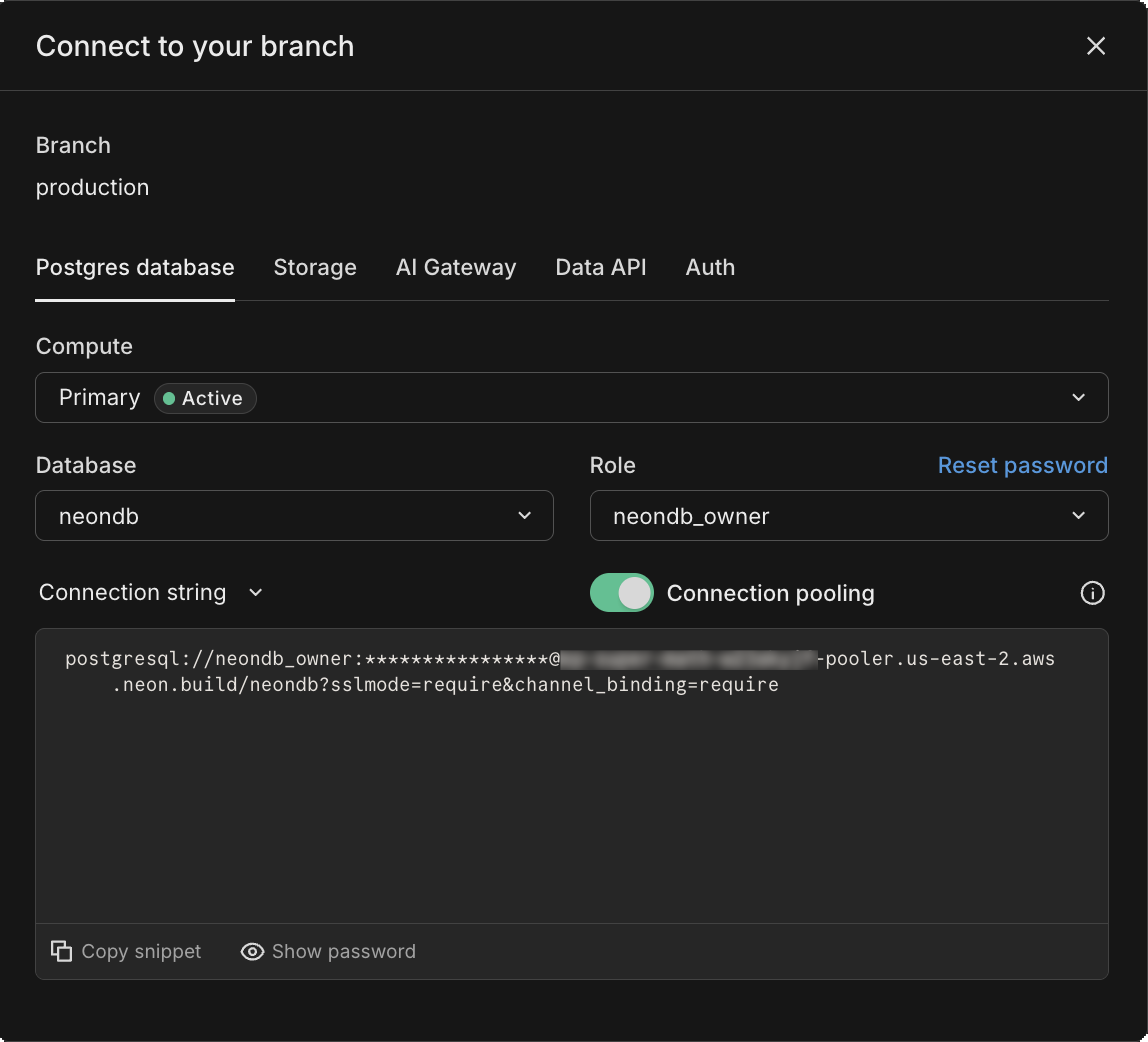
The connection string includes everything you need to connect:
postgresql://alex:AbC123dEf@ep-cool-darkness-a1b2c3d4.us-east-2.aws.neon.tech/dbname?sslmode=require
             ^    ^         ^                                                   ^
       role -|    |         |- hostname                                        |- database
                  |
                  |- password
Note: Neon supports both pooled and direct connections. Use a pooled connection string (with -pooler in the hostname) if your application creates many concurrent connections. See Connection pooling for details.
Connect from your application
Section titled “Connect from your application”Use your connection string to connect from any application. Here are examples for various frameworks and languages:
Neon serverless driver
// Works in Node.js, Next.js, serverless, and edge runtimes
import { neon } from '@neondatabase/serverless';

const sql = neon(process.env.DATABASE_URL);

const users = await sql`SELECT * FROM users`;
Next.js
// Next.js example
import postgres from 'postgres';

let { PGHOST, PGDATABASE, PGUSER, PGPASSWORD } = process.env;

const conn = postgres({
  host: PGHOST,
  database: PGDATABASE,
  username: PGUSER,
  password: PGPASSWORD,
  port: 5432,
  ssl: 'require',
});

const users = await conn`SELECT * FROM users`;
Drizzle
// Drizzle example with the Neon serverless driver
import { neon } from '@neondatabase/serverless';
import { drizzle } from 'drizzle-orm/neon-http';

const sql = neon(process.env.DATABASE_URL);

const db = drizzle(sql);

const result = await db.select().from(...);
Prisma
// Prisma example with the Neon serverless driver
import { neon } from '@neondatabase/serverless';
import { PrismaNeonHTTP } from '@prisma/adapter-neon';
import { PrismaClient } from '@prisma/client';

const sql = neon(process.env.DATABASE_URL);

const adapter = new PrismaNeonHTTP(sql);

const prisma = new PrismaClient({ adapter });
Python
# Python example with psycopg2
import os
import psycopg2

# Load the environment variable
database_url = os.getenv('DATABASE_URL')

# Connect to the PostgreSQL database
conn = psycopg2.connect(database_url)

with conn.cursor() as cur:
    cur.execute("SELECT version()")
    print(cur.fetchone())

# Close the connection
conn.close()
Go
// Go example
package main
import (
    "database/sql"
    "fmt"
    "log"
    "os"

    _ "github.com/lib/pq"
    "github.com/joho/godotenv"
)

func main() {
    err := godotenv.Load()
    if err != nil {
        log.Fatalf("Error loading .env file: %v", err)
    }

    connStr := os.Getenv("DATABASE_URL")
    if connStr == "" {
        panic("DATABASE_URL environment variable is not set")
    }

    db, err := sql.Open("postgres", connStr)
    if err != nil {
        panic(err)
    }
    defer db.Close()

    var version string
    if err := db.QueryRow("select version()").Scan(&version); err != nil {
        panic(err)
    }
    fmt.Printf("version=%s\n", version)
}
.NET
# .NET example

## Connection string
"Host=ep-cool-darkness-123456.us-east-2.aws.neon.tech;Database=dbname;Username=alex;Password=AbC123dEf"

## with SSL
"Host=ep-cool-darkness-123456.us-east-2.aws.neon.tech;Database=dbname;Username=alex;Password=AbC123dEf;SSL Mode=Require;Trust Server Certificate=true"

## Entity Framework (appsettings.json)
{
  ...
  "ConnectionStrings": {
    "DefaultConnection": "Host=ep-cool-darkness-123456.us-east-2.aws.neon.tech;Database=dbname;Username=alex;Password=AbC123dEf;SSL Mode=Require;Trust Server Certificate=true"
  },
  ...
}
Ruby
# Ruby example
require 'pg'
require 'dotenv'

# Load environment variables from .env file
Dotenv.load

# Connect to the PostgreSQL database using the environment variable
conn = PG.connect(ENV['DATABASE_URL'])

# Execute a query
conn.exec("SELECT version()") do |result|
  result.each do |row|
    puts "Result = #{row['version']}"
  end
end

# Close the connection
conn.close
Rust
// Rust example
use postgres::Client;
use openssl::ssl::{SslConnector, SslMethod};
use postgres_openssl::MakeTlsConnector;
use std::error;
use std::env;
use dotenv::dotenv;

fn main() -> Result<(), Box<dyn error::Error>> {
    // Load environment variables from .env file
    dotenv().ok();

    // Get the connection string from the environment variable
    let conn_str = env::var("DATABASE_URL")?;

    let builder = SslConnector::builder(SslMethod::tls())?;
    let connector = MakeTlsConnector::new(builder.build());
    let mut client = Client::connect(&conn_str, connector)?;

    for row in client.query("select version()", &[])? {
        let ret: String = row.get(0);
        println!("Result = {}", ret);
    }
    Ok(())
}
psql
# psql example connection string
psql postgresql://username:password@hostname:5432/database?sslmode=require&channel_binding=require
Store your connection string in an environment variable (like DATABASE_URL) rather than hardcoding it in your application.
Next steps
Section titled “Next steps”This covers the basics. For more connection options and detailed guidance:
- Connect documentation: Comprehensive guide to all connection methods, troubleshooting, and security
- Framework guides: Step-by-step guides for Next.js, Remix, Django, Rails, and more
- Language guides: Connection examples for JavaScript, Python, Go, Rust, and other languages
- Serverless driver: Connect from serverless and edge environments using HTTP or WebSockets
- Set up Auth: Managed Better Auth that branches with your database