Database branching workflow primer
With Neon, you can work with your data just like you work with your code. The key is Neon's database branching feature, which lets you instantly create branches of your data that you can include in yo...
With Neon, you can work with your data just like you work with your code. The key is Neon's database branching feature, which lets you instantly create branches of your data that you can include in your workflow, as many branches as you need.
Neon branches are:
- Isolated: changes made to a branch don't affect its parent.
- Fast to create: creating a branch takes ~1 second, regardless of the size of your database.
- Ready to use: branches will have the parent branch's schema and all its data (you can also include data up to a certain point in time). If you're working with sensitive data, Neon also supports a schema-only branching option.
Every Neon branch has a unique Postgres connection string, so they're completely isolated from one another.
# Branch 1
postgresql://database_name_owner:AbC123dEf@ep-shiny-cell-a5y2zuu0.us-east-2.aws.neon.tech/dbname?sslmode=require&channel_binding=require

# Branch 2
postgresql://database_name_owner:AbC123dEf@ep-hidden-hall-a5x58cuv.us-east-2.aws.neon.tech/dbname?sslmode=require&channel_binding=require
You can create all of your branches from the default branch, or set up a dedicated branch that you use as a base. The first approach is simpler, while the second provides greater data isolation.
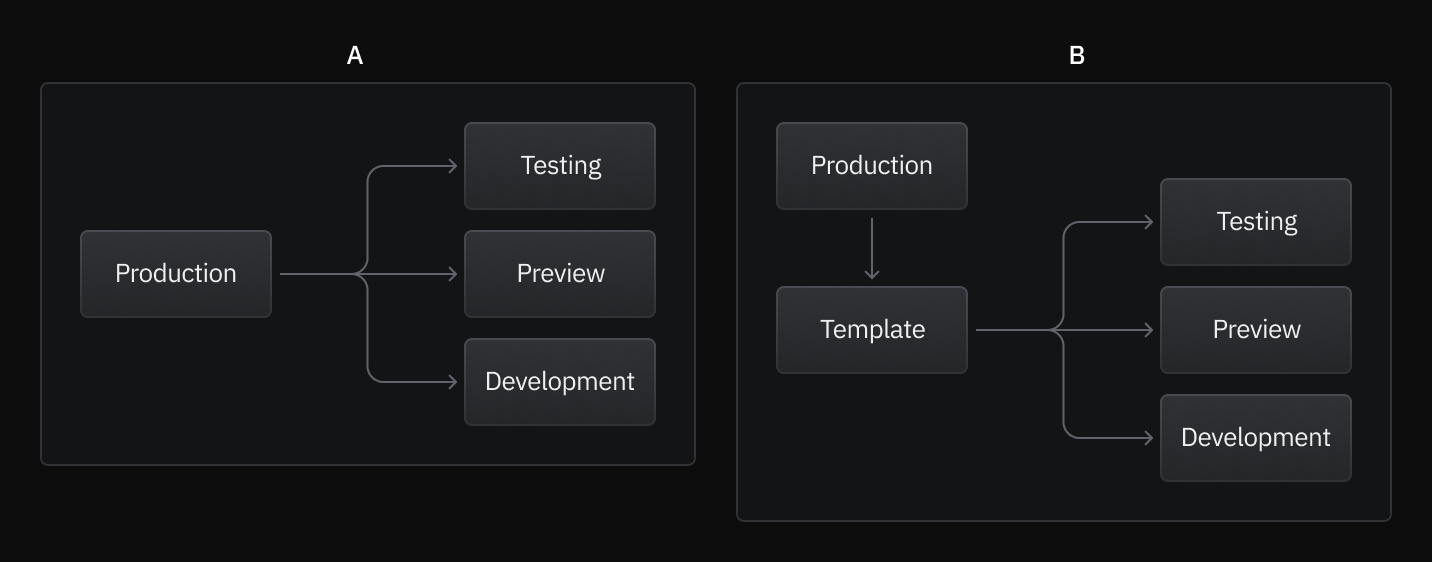
Create branch methods
Section titled “Create branch methods”You can use either the Neon CLI or GitHub actions to incorporate branching into your workflow.
Neon CLI
Section titled “Neon CLI”Using the Neon CLI, you can create branches without leaving your editor or automate branch creation in your CI/CD pipeline.
And here are the key CLI actions you can use:
# Create branch
neon branches create [options]

# Get Connection string
neon connection-string [branch] [options]

# Delete branch
neon branches delete <id|name> [options]
For more information, see:
 Branching with the Neon CLI Learn about branching with the Neon CLI
- Neon CLI Reference Reference for all commands in the Neon CLI
GitHub Actions
Section titled “GitHub Actions”If you're using GitHub Actions for your CI workflows, Neon provides GitHub Actions for creating, deleting, and resetting branches, and there's also a schema diff action.
Here is an example of what a create branch action might look like:
name: Create Neon Branch with GitHub Actions Demo
run-name: Create a Neon Branch 🚀
jobs:
  Create-Neon-Branch:
    uses: neondatabase/create-branch-action@v5
    with:
      project_id: rapid-haze-373089
      parent_id: br-long-forest-224191
      branch_name: from_action_reusable
      api_key: {{ secrets.NEON_API_KEY }}
    id: create-branch
  - run: echo project_id ${{ steps.create-branch.outputs.project_id}}
  - run: echo branch_id ${{ steps.create-branch.outputs.branch_id}}
You can find these GitHub Actions here:
- Create branch Action Create Neon Branch GitHub Action
- Delete Branch Action Delete Neon Branch GitHub Action
- Reset Branch Action Reset Neon Branch GitHub Action
- Schema Diff Action Neon Schema Diff GitHub Action
For more detailed documentation, see Automate branching with GitHub Actions.
A branch for every environment
Section titled “A branch for every environment”Here's how you can integrate Neon branching into your workflow:
Development
Section titled “Development”You can create a Neon branch for every developer on your team. This ensures that every developer has an isolated environment that includes schemas and data. These branches are meant to be long-lived, so each developer can tailor their branch based on their needs. With Neon's branch reset capability, developers can refresh their branch with the latest schemas and data anytime they need. You can invite teammates to your organization so they have access to all your projects. See Invite members.
Preview environments
Section titled “Preview environments”Whenever you create a pull request, you can create a Neon branch for your preview deployment. This allows you to test your code changes and SQL migrations against production-like data.
We recommend following this naming convention to identify preview branches easily:
preview/pr-<pull_request_number>-<git_branch_name>Example:
preview/pr-123-feat/new-login-screenYou can also automate branch creation for every preview. These example applications show how to create Neon branches with GitHub Actions for every preview environment.
- Preview branches with Fly.io Sample project showing you how to create a branch for every Fly.io preview deployment
- Preview branches with Vercel Sample project showing you how to create a branch for every Vercel preview deployment
Testing
Section titled “Testing”When running automated tests that require a database, each test run can have its branch with its own compute resources. You can create a branch at the start of a test run and delete it at the end.
You can create test branches from the same date and time or Log Sequence Number (LSN) for tests requiring static or deterministic data.
Additional branching features
Section titled “Additional branching features”Working with sensitive data
Section titled “Working with sensitive data”If you're working with sensitive data and need to avoid copying production data to development or test environments, Neon supports schema-only branching. This creates branches with only the database schema (tables, indexes, constraints) without any of the actual data, allowing you to populate branches with anonymized or synthetic data instead.
Automatic branch cleanup
Section titled “Automatic branch cleanup”To prevent branch accumulation and manage resources effectively, you can set branches to automatically expire and be deleted after a specified time period. This is a good fit for temporary environments like CI/CD test branches or time-limited preview deployments. See Branch expiration for details on configuring automatic branch deletion.
Need help?
Section titled “Need help?”Join our Discord Server to ask questions or see what others are doing with Neon. For paid plan support options, see Support.