Use Managed Better Auth with React (API methods)
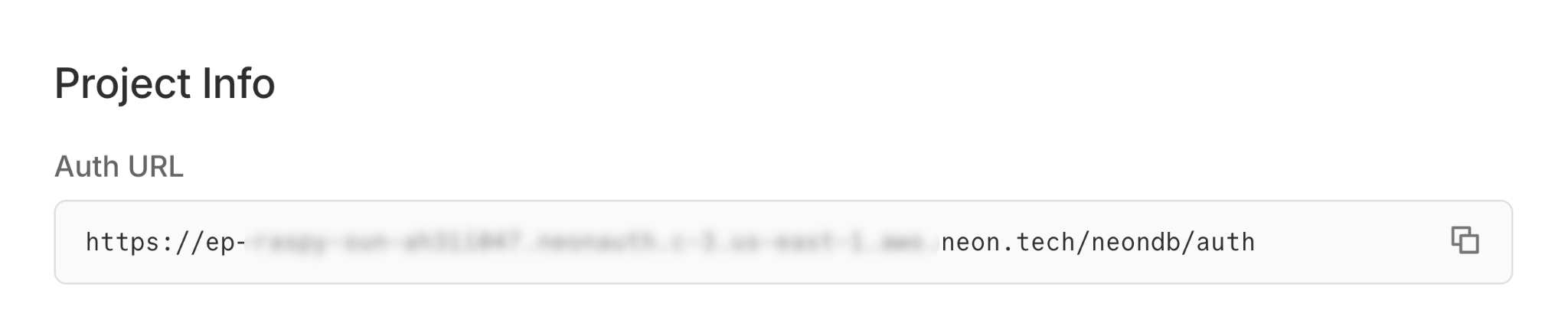
If you don't have a Neon project yet, create one at console.neon.tech. Go to the Auth page in your project dashboard and click Enable Auth. You can then find your Auth Base URL on the Configuration ta...
Create a Neon project with Auth enabled
If you don't have a Neon project yet, create one at console.neon.tech.
Go to the Auth page in your project dashboard and click Enable Auth.
You can then find your Auth Base URL on the Configuration tab. Copy this URL - you'll need it in the next step.
Console
Create a React app
Create a React app using Vite.
Bash npm create vite@latest my-app -- --template reactInstall the Neon SDK
The Neon SDK provides authentication methods like
signUp(),getSession(), andsignOut()for your React app.Bash cd my-app npm install @neondatabase/neon-js@latestSet up environment variables
Create a
.envfile in your project root and add your Auth Base URL:.env VITE_NEON_AUTH_URL=https://ep-xxx.neonauth.us-east-2.aws.neon.build/neondb/authConfigure the Neon client
Create a
src/auth.jsfile to configure your auth client:src/auth.js import { createAuthClient } from '@neondatabase/neon-js/auth'; export const authClient = createAuthClient(import.meta.env.VITE_NEON_AUTH_URL);Build your authentication UI
Neon JS uses a programmatic approach for managing auth state. You'll use React hooks like
useEffectto check the session and handle auth changes.Replace the contents of
src/App.jsxwith the following code to implement sign-up, sign-in, and sign-out:src/App.jsx import { useState, useEffect } from 'react'; import { authClient } from './auth'; import './App.css'; export default function App() { const [session, setSession] = useState(null); const [user, setUser] = useState(null); const [email, setEmail] = useState(''); const [password, setPassword] = useState(''); const [isSignUp, setIsSignUp] = useState(true); const [loading, setLoading] = useState(true); useEffect(() => { authClient.getSession().then((result) => { if (result.data?.session && result.data?.user) { setSession(result.data.session); setUser(result.data.user); } setLoading(false); }); }, []); const handleSubmit = async (e) => { e.preventDefault(); const result = isSignUp ? await authClient.signUp.email({ name: email.split('@')[0] || 'User', email, password }) : await authClient.signIn.email({ email, password }); if (result.error) { alert(result.error.message); return; } const sessionResult = await authClient.getSession(); if (sessionResult.data?.session && sessionResult.data?.user) { setSession(sessionResult.data.session); setUser(sessionResult.data.user); } }; const handleSignOut = async () => { await authClient.signOut(); setSession(null); setUser(null); }; if (loading) return <div>Loading...</div>; if (session && user) { return ( <div> <h1>Logged in as {user.email}</h1> <button onClick={handleSignOut}>Sign Out</button> </div> ); } return ( <form onSubmit={handleSubmit}> <h1>{isSignUp ? 'Sign Up' : 'Sign In'}</h1> <input type="email" placeholder="Email" value={email} onChange={(e) => setEmail(e.target.value)} required /> <input type="password" placeholder="Password" value={password} onChange={(e) => setPassword(e.target.value)} required /> <button type="submit">{isSignUp ? 'Sign Up' : 'Sign In'}</button> <p> {isSignUp ? ( <> Already have an account?{' '} <a href="#" onClick={(e) => { e.preventDefault(); setIsSignUp(false); }} > Sign in </a> </> ) : ( <> Don't have an account?{' '} <a href="#" onClick={(e) => { e.preventDefault(); setIsSignUp(true); }} > Sign up </a> </> )} </p> </form> ); }Start your app
Start the development server:
Open your browser to
http://localhost:5173and create a test user.Bash npm run devSee your users in the database
As users sign up, their profiles are synced to your Neon database in the
neon_auth.usertable.Query your users table in the SQL Editor to see your new users:
SQL Editor SELECT * FROM neon_auth.user;
Next steps
Section titled “Next steps”- Learn about Managed Better Auth concepts
- More example apps in the neon-js
examples/directory - Explore the Neon Data API to build a REST API for your data
- View complete SDK reference