Connect your app
For all backend services, you connect your app to a particular branch. Each branch can serve whichever services you have enabled Lakebase Postgres, Object Storage, Managed Better Auth, and AI Gateway....
For all backend services, you connect your app to a particular branch. Each branch can serve whichever services you have enabled: Lakebase Postgres, Object Storage, Managed Better Auth, and AI Gateway.
Choose your branch
Credentials are branch-scoped. Each branch has its own isolated credentials and data, whether it is your default branch (for example,
main) or a child branch you use for development, testing, or preview deployments.A child branch is a copy-on-write clone of its parent, so it starts with isolated credentials and its own copy of the data. You can test your app with real authentication workflows and real storage without touching your default branch. See Develop with preview branches below.
Get your connection details
You can get connection details from the Console, CLI, or API.
In the Neon Console, select your project and branch and click Connect to open the Connect to your branch modal.
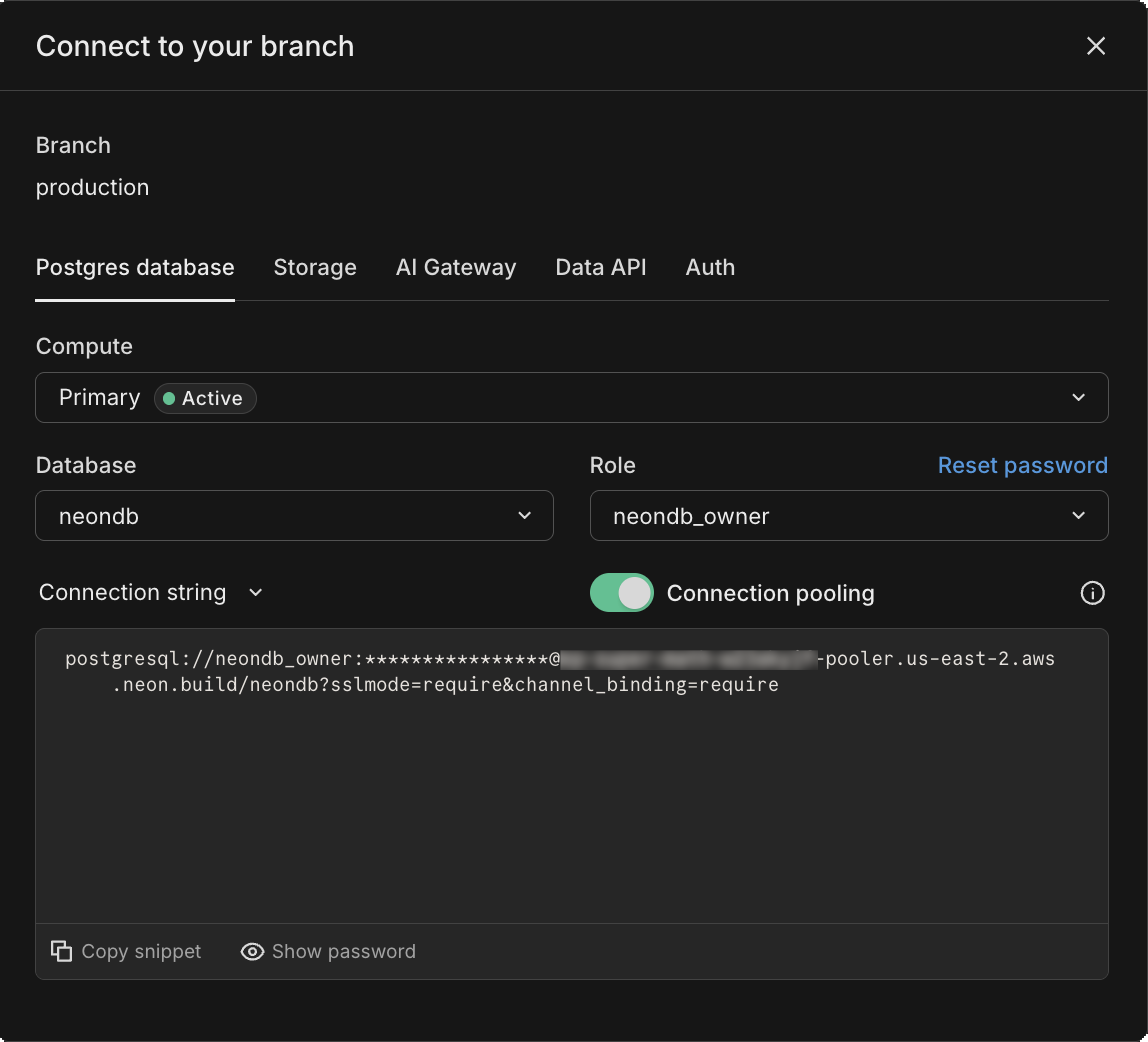
For Postgres credentials, use
neon connection-string:Bash neon connection-string mybranch --database-name mydb --role-name myroleTo pull all credentials for a branch (including Object Storage, Data API, Auth, and Functions if declared in
neon.ts), useneon env pull:Bash neon env pull --branch mybranch --file .env.localBy default,
neon env pullwritesDATABASE_URL,DATABASE_URL_UNPOOLED, andNEON_BRANCH. With aneon.tsfile declaring services, it also writes credentials for each service. Use--serviceto pull only specific services:Bash neon env pull --service postgres --service object-storageFor Postgres, fetch the connection string with
GET /api/v2/projects/{project_id}/connection_uri:Bash curl "https://console.neon.tech/api/v2/projects/{project_id}/connection_uri?branch_id={branch_id}&database_name={database_name}&role_name={role_name}" \ -H "Authorization: Bearer $NEON_API_KEY"For Object Storage credentials, use
POST /api/v2/projects/{project_id}/branches/{branch_id}/credentialswithstorage:readandstorage:writescopes. For Data API and Auth, see Managing the Data API and Manage Auth via the API.Store your credentials
Store credentials in
.envfiles for local development, in your CI secrets manager for CI/CD workflows, or let Neon Functions auto-inject them if you are deploying to Neon Functions.Local development
Use
neon env pullto write credentials to.env.local(or.env):Bash neon env pull --file .env.localThis writes
DATABASE_URL,DATABASE_URL_UNPOOLED,NEON_BRANCH, and (if you have aneon.tsdeclaring services) credentials for Object Storage (AWS_ACCESS_KEY_ID,AWS_SECRET_ACCESS_KEY,AWS_ENDPOINT_URL_S3,AWS_REGION), Data API, and Auth.Production and CI
For production deployments, store credentials in your secrets manager (AWS Secrets Manager, Vercel environment variables, GitHub Secrets, etc.). Fetch credentials from the Console, CLI, or API, then set them in your platform's secrets configuration.
Neon Functions
A deployed Neon Function gets credentials injected automatically for every service enabled on its branch. Enable Object Storage and the
AWS_*credentials are inprocess.envwith no manual setup. Declaring buckets inneon.tsis what pulls those credentials into your local.env(see Local development above) and gives you type-safe access. See Neon Functions environment variables.Use each service
Use the credentials for your selected branch with each enabled service.
Lakebase Postgres is serverless Postgres that you can access with any Postgres driver or the Neon serverless driver.
You can also reach the same Postgres data over HTTP through the Neon Data API. It provides a PostgREST-compatible interface for clients that cannot use a Postgres driver.
TypeScript import { neon } from '@neondatabase/serverless'; const sql = neon(process.env.DATABASE_URL!); const rows = await sql`SELECT * FROM users`;Learn more: Connect from any app
Neon Object Storage is S3-compatible storage. Configure an AWS S3 SDK with the branch-specific
AWS_ACCESS_KEY_ID,AWS_SECRET_ACCESS_KEY,AWS_ENDPOINT_URL_S3, andAWS_REGIONenvironment variables.TypeScript import { S3Client } from '@aws-sdk/client-s3'; const client = new S3Client({ region: process.env.AWS_REGION, endpoint: process.env.AWS_ENDPOINT_URL_S3, credentials: { accessKeyId: process.env.AWS_ACCESS_KEY_ID!, secretAccessKey: process.env.AWS_SECRET_ACCESS_KEY!, }, forcePathStyle: true, });Learn more: Neon Object Storage overview
Neon AI Gateway uses a branch-scoped credential. Set
NEON_AI_GATEWAY_BASE_URLto the branch host, append a dialect path such as/v1, and authenticate withNEON_AI_GATEWAY_TOKEN.TypeScript import OpenAI from 'openai'; import 'dotenv/config'; const client = new OpenAI({ apiKey: process.env.NEON_AI_GATEWAY_TOKEN, baseURL: `${process.env.NEON_AI_GATEWAY_BASE_URL}/v1`, }); const response = await client.chat.completions.create({ model: 'gpt-5-mini', messages: [{ role: 'user', content: 'Hello!' }], }); console.log(response.choices[0].message.content);Learn more: AI Gateway overview
Managed Better Auth stores authentication data in the
neon_authschema and remains branch-aware as your database branches.TypeScript import { createAuthClient } from '@neondatabase/neon-js/auth'; export const authClient = createAuthClient(import.meta.env.VITE_NEON_AUTH_URL);Learn more: Managed Better Auth overview
Note: Credentials access and the object model
This guide focuses on connecting your app. For deeper background on how credentials work in Neon and how they map to the object hierarchy (projects, branches, databases, roles), see Credentials and access and The object model.
Develop with preview branches
When you create a child branch from your default branch, the child branch gets its own credentials that are valid only for that branch and its descendants. This means you can test authentication workflows, storage uploads, and data changes in a development, test, or preview environment without affecting your default branch.
Credentials are branch-scoped: a credential created on a branch is valid for that branch and any branches descended from it. It's not valid for branches outside that lineage. See How branch binding works for details.
To automate preview branches, use GitHub Actions or the Vercel integration. For how branches work, see Get started with branching.
Rotate or revoke
Section titled “Rotate or revoke”To rotate a Postgres password, generate a new one in the Console or CLI and update your environment variables. For Object Storage credentials, create a new credential, update your app, then revoke the old one. See Revoking object storage credentials for API details.
Credential rotation workflows for Data API and Auth are similar: create a new credential or reset the password, update your app, then revoke the old one.
Where to go next
Section titled “Where to go next”- Credentials and access - how credentials work in Neon
- The object model - projects, branches, databases, and roles
- Connect to Neon - connection methods, drivers, and tools
- Object Storage overview - buckets, objects, and authentication
- AI Gateway overview - unified access to AI models
- Data API overview - REST API for Postgres
- Managed Better Auth overview - managed authentication service
Need help?
Section titled “Need help?”Join our Discord Server to ask questions or see what others are doing with Neon. For paid plan support options, see Support.