Neon Local
Neon Local is a proxy service that creates a local interface to your Neon cloud database. It supports two main use cases 1. Connecting to existing Neon branches Connect your app to any existing branch...
Neon Local is a proxy service that creates a local interface to your Neon cloud database. It supports two main use cases:
- Connecting to existing Neon branches - Connect your app to any existing branch in your Neon project
- Connecting to ephemeral Neon branches - Connect your app to a new ephemeral database branch that is instantly created when the Neon Local container starts and deleted when the container stops
Your application connects to a local Postgres endpoint, while Neon Local handles routing and authentication to the correct project and branch. This removes the need to update connection strings when working across database branches.
Connect to existing Neon branch
Section titled “Connect to existing Neon branch”To connect to an existing Neon branch, provide the BRANCH_ID environment variable to the container. This allows you to work with a specific branch without creating a new one.
Docker run
Section titled “Docker run”docker run \
--name db \
-p 5432:5432 \
-e NEON_API_KEY=<your_neon_api_key> \
-e NEON_PROJECT_ID=<your_neon_project_id> \
-e BRANCH_ID=<your_branch_id> \
neondatabase/neon_local:latestDocker Compose
Section titled “Docker Compose”db:
image: neondatabase/neon_local:latest
ports:
- '5432:5432'
environment:
NEON_API_KEY: ${NEON_API_KEY}
NEON_PROJECT_ID: ${NEON_PROJECT_ID}
BRANCH_ID: ${BRANCH_ID}Ephemeral database branches for development and testing
Section titled “Ephemeral database branches for development and testing”To create ephemeral branches (default behavior), provide the PARENT_BRANCH_ID environment variable instead of BRANCH_ID. The Neon Local container automatically creates a new ephemeral branch of your database when the container starts, and deletes it when the container stops. This ensures that each time you deploy your app via Docker Compose, you have a fresh copy of your database, without needing manual cleanup or orchestration scripts. Your database branch lifecycle is tied directly to your Docker environment.
Docker run
Section titled “Docker run”docker run \
--name db \
-p 5432:5432 \
-e NEON_API_KEY=<your_neon_api_key> \
-e NEON_PROJECT_ID=<your_neon_project_id> \
-e PARENT_BRANCH_ID=<parent_branch_id> \
neondatabase/neon_local:latestDocker Compose
Section titled “Docker Compose”db:
image: neondatabase/neon_local:latest
ports:
- '5432:5432'
environment:
NEON_API_KEY: ${NEON_API_KEY}
NEON_PROJECT_ID: ${NEON_PROJECT_ID}
PARENT_BRANCH_ID: ${PARENT_BRANCH_ID}Docker run instructions
Section titled “Docker run instructions”Run the Neon Local container using the following docker run command:
docker run \
  --name db \
  -p 5432:5432 \
  -e NEON_API_KEY=<your_neon_api_key> \
  -e NEON_PROJECT_ID=<your_neon_project_id> \
  neondatabase/neon_local:latest
Docker Compose instructions
Section titled “Docker Compose instructions”Add Neon Local to your docker-compose.yml:
db:
  image: neondatabase/neon_local:latest
  ports:
    - '5432:5432'
  environment:
    NEON_API_KEY: ${NEON_API_KEY}
    NEON_PROJECT_ID: ${NEON_PROJECT_ID}
Multi-driver support
Section titled “Multi-driver support”The Neon Local container now supports both the postgres and Neon serverless drivers simultaneously through a single connection string. You no longer need to specify a driver or configure different connection strings for different drivers.
Connecting your app (Postgres driver)
Section titled “Connecting your app (Postgres driver)”Connect to Neon Local using a standard Postgres connection string.
Docker run
Section titled “Docker run”postgres://neon:npg@localhost:5432/<database_name>?sslmode=requireDocker compose
Section titled “Docker compose”postgres://neon:npg@${db}$:5432/<database_name>?sslmode=require
# where {db} is the name of the Neon Local service in your compose fileConnecting your app (Neon serverless driver)
Section titled “Connecting your app (Neon serverless driver)”Connect using the Neon serverless driver.
Docker run
Section titled “Docker run”import { neon, neonConfig } from '@neondatabase/serverless';
neonConfig.fetchEndpoint = 'http://localhost:5432/sql';
neonConfig.useSecureWebSocket = false;
neonConfig.poolQueryViaFetch = true;
const sql = neon('postgres://neon:npg@localhost:5432/<database_name>');Docker compose
Section titled “Docker compose”import { neon, neonConfig } from '@neondatabase/serverless';
neonConfig.fetchEndpoint = 'http://{db}:5432/sql';
neonConfig.useSecureWebSocket = false;
neonConfig.poolQueryViaFetch = true;
const sql = neon('postgres://neon:npg@{db}:5432/<database_name>');
// where {db} is the name of the Neon Local service in your compose fileNo additional environment variables are needed - the same Docker configuration works for both drivers:
docker run \
  --name db \
  -p 5432:5432 \
  -e NEON_API_KEY=<your_neon_api_key> \
  -e NEON_PROJECT_ID=<your_neon_project_id> \
  neondatabase/neon_local:latest
Environment variables and configuration options
Section titled “Environment variables and configuration options”| Variable | Description | Required | Default |
|---|---|---|---|
NEON_API_KEY |
Your Neon API key. Manage API Keys | Yes | N/A |
NEON_PROJECT_ID |
Your Neon project ID. Found under Project Settings → General in the Neon console. | Yes | N/A |
BRANCH_ID |
Connect to an existing Neon branch. Mutually exclusive with PARENT_BRANCH_ID. |
No | N/A |
PARENT_BRANCH_ID |
Create ephemeral branch from parent. Mutually exclusive with BRANCH_ID. |
No | your project's default branch |
DRIVER |
Deprecated - Both drivers now supported simultaneously. | No | N/A |
DELETE_BRANCH |
Set to false to persist branches after container shutdown. |
No | true |
Persistent Neon branch per Git branch
Section titled “Persistent Neon branch per Git branch”To persist a branch per Git branch, add the following volume mounts:
db:
  image: neondatabase/neon_local:latest
  ports:
    - '5432:5432'
  environment:
    NEON_API_KEY: ${NEON_API_KEY}
    NEON_PROJECT_ID: ${NEON_PROJECT_ID}
    DELETE_BRANCH: false
  volumes:
    - ./.neon_local/:/tmp/.neon_local
- ./.git/HEAD:/tmp/.git/HEAD:ro,consistentGit integration using Docker on Mac
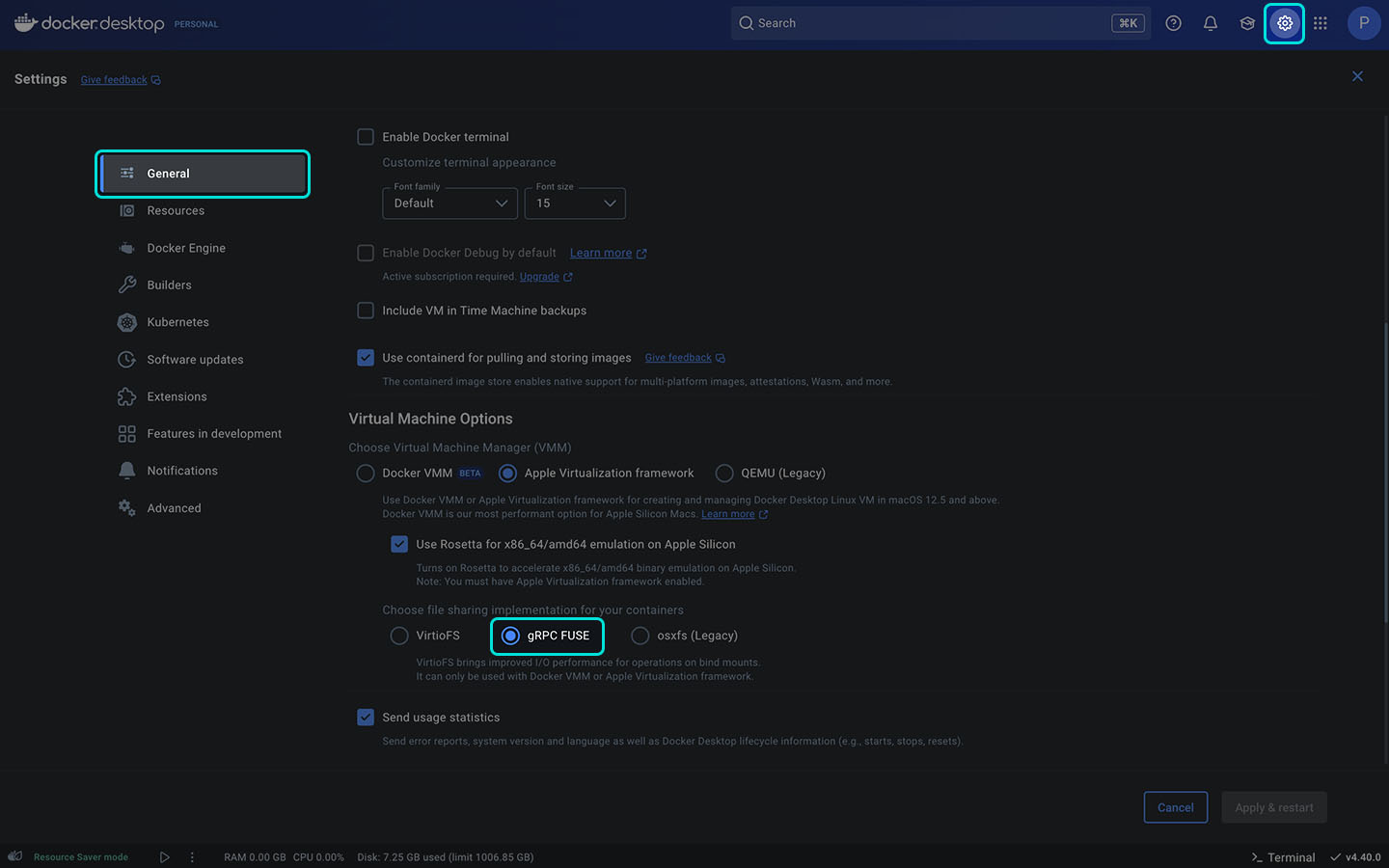
Section titled “Git integration using Docker on Mac”If using Docker Desktop for Mac, ensure that your VM settings use gRPC FUSE instead of VirtioFS. There is currently a known bug with VirtioFS that prevents proper branch detection and live updates inside containers.